
Server installation
Install the Control Plane from pole-control-plane, initialize MySQL, and verify Console and protocol listeners.
This guide covers local binary / go run and local Kubernetes paths. Commands and ports come from AGENTS.md, deploy/conf/*, and deploy/kubernetes/README.md. There is no Helm chart for the control plane in that repository.
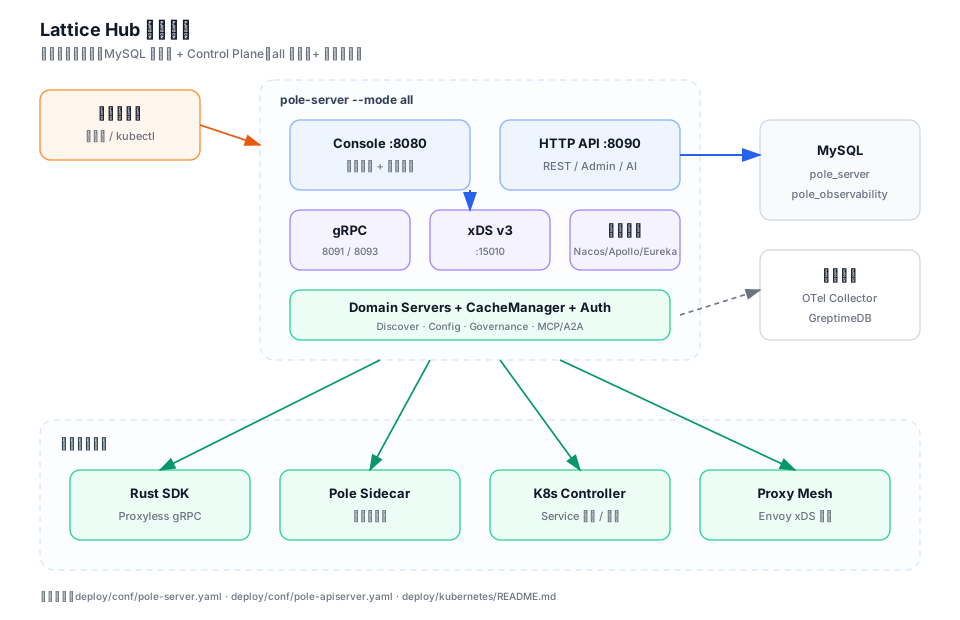
What you get
- Console:
http://127.0.0.1:8080 - HTTP API:
8090 - Discovery gRPC:
8091 - Config gRPC:
8093 - xDS v3:
15010 - Compatible listeners when enabled: Eureka
8761, Nacos8848, Apollo8890
Prerequisites
| Dependency | Need |
|---|---|
| Go | make build / go run |
| Node.js + npm | Build Console assets into console/web/dist |
| MySQL | Databases pole_server and pole_observability |
| Docker / kubectl | Optional for local Kubernetes and observability |
export MYSQL_USER=root
export MYSQL_PWD='your-password'
export MYSQL_HOST=127.0.0.1:3306
export POLE_CONSOLE_JWT_SECRET='replace-with-console-jwt-secret'
export POLE_AUTH_SALT='1234567890123456'   # length 16 / 24 / 32
export POLE_SYSTEM_SECRET_MASTER_KEY='replace-with-32-byte-master-key'
1. Prepare MySQL
mysql -h127.0.0.1 -uroot -p < plugin/store/mysql/scripts/pole_server.sqlThis creates pole_server and seed namespaces pole-system and default. It does not create an admin user.
CREATE DATABASE IF NOT EXISTS pole_observability
  DEFAULT CHARACTER SET utf8mb4
  DEFAULT COLLATE utf8mb4_bin;
Business DSN shape:
${MYSQL_USER}:${MYSQL_PWD}@tcp(${MYSQL_HOST})/pole_server?loc=Local2. Build and start locally
make build

MYSQL_USER=root MYSQL_PWD='your-password' MYSQL_HOST=127.0.0.1:3306 \
  ./scripts/rebuild-start-all.sh

# or
MYSQL_USER=root MYSQL_PWD='your-password' MYSQL_HOST=127.0.0.1:3306 \
go run . start -c ./deploy/conf/pole-server.yaml --mode all| Mode | Purpose |
|---|---|
all | Control Plane + embedded Console |
server | APIs and protocol servers only |
console | Console gateway only |
3. Key configuration
Primary file: deploy/conf/pole-server.yaml
API ports: deploy/conf/pole-apiserver.yaml
Confirm bootstrap.mode, Console JWT/salt/master key, MySQL DSN, webPath, and poleServer.address. Pole Agent requires a non-empty LLM gateway URL and API key; otherwise the rest of the control plane still works.
4. Initialize the main user
There is no hardcoded default admin password. Open the Console, use /init-admin when prompted, then sign in.
curl -fsS http://127.0.0.1:8080/admin/v1/server/functions
curl -fsS http://127.0.0.1:8090/admin/v1/server/functions
Kubernetes probes use the same admin functions path; there is no dedicated /health endpoint in-tree.
5. Local Kubernetes
./deploy/kubernetes/build-image.sh

MYSQL_USER=root MYSQL_PWD='your-password' \
POLE_CONSOLE_JWT_SECRET='replace-with-local-console-secret' \
POLE_AUTH_SALT='1234567890123456' \
  ./deploy/kubernetes/deploy-local.sh
Optional observability stack: deploy/observability/docker-compose.yaml (GreptimeDB + Collector only).
Checklist
| Check | Expectation |
|---|---|
| MySQL | Both databases readable/writable |
| Console | Page loads; main user created |
| HTTP / gRPC | 8090 / 8091 / 8093 reachable |
| Cache | Warm-up and incremental refresh in logs |
| Secrets | JWT/salt/master key replaced for the environment |
Troubleshooting order
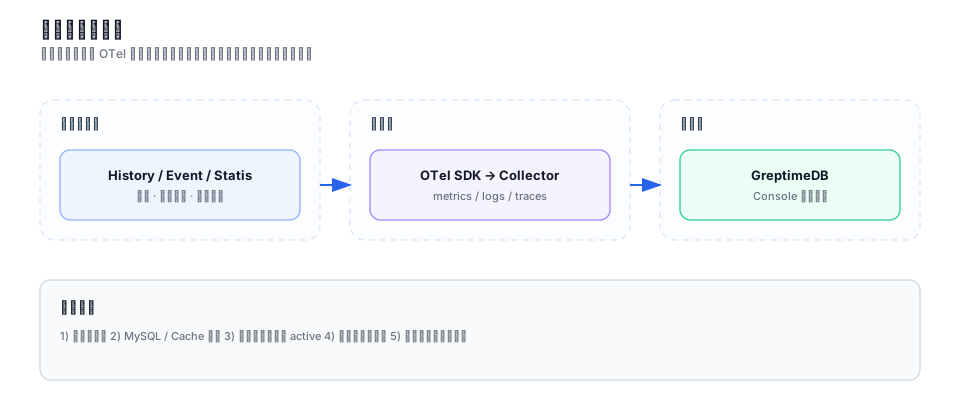
- Confirm listeners on 8080/8090/8091/8093.
- Confirm MySQL databases and CacheManager warm-up.
- Confirm resources are published active (clients do not read drafts).
- Confirm caller identity/policy allows the operation.
- Confirm observability stack and client addresses only after the main path works.
Common misses: SDK pointed at Console 8080 instead of gRPC 8091/8093; auth salt length not 16/24/32; platform metrics empty because GreptimeDB/Collector were never deployed.